



A CNC machine only makes money when the spindle is turning. Yet, it’s common to see a machine sit idle for 20 minutes while the operator digs through a miscellaneous drawer looking for a $15 insert.
This frustration often leads to a standoff where you know the current system is failing, but the traditional alternatives feel just as out of reach.
You might think that tool management requires a massive infrastructure such as dedicated rooms, vending machines, and complex ERP implementations, but for a small machine shop, that's overkill. At the same time, doing nothing also has certain costs associated with it:
- If your team spends 15 minutes a day hunting for tools, that’s over 60 hours of lost machine time per year, per person.
- When machinists don't trust the inventory levels, they start "squirreling" tools in their personal toolboxes, and you end up ordering replacements for tools you already own.
- Without knowing exactly what a job consumed in tooling, you’re estimating your margins. Often, the jobs you think are profitable are actually losing money once you factor in broken cutters and expedited shipping fees.
So, if your priority is keeping the spindle turning instead of playing detective, here is a practical approach to tool management that actually works for your shop.
Limits of manual tool data management
Most shops start with a spreadsheet because it’s better than memory and a well-maintained Excel file sounds like a perfectly rational choice.
As your shop starts to grow, friction shows up, and suddenly manual tracking doesn’t work anymore for your busy shop. You’ll know you’ve reached the limit of manual systems when you see these three things happening:
- The programmer has one version of the tool list on their desktop, the floor has a printed copy from last Tuesday, and the owner is looking at a third version in the office. No one actually knows which one is the “right one.”
- When a rush job hits at 4:00 PM, nobody stops to update a spreadsheet cell. This one missed entry means your inventory count is wrong for the rest of the month.
- Your tool inventory lives in one file, but your setup sheets live in a folder, and your vendor pricing lives in your email. Because these systems don't talk to each other, you’re still doing manual data entry three different times for every job.
Recognizing these friction points is the first step toward reclaiming your time. The question then becomes whether the solution is a simple process change or if it’s time to look at a dedicated platform to handle the heavy lifting for you.
Does your shop actually need tool management software?
Whether you need a dedicated system depends entirely on the size of your team and your machine count.
If you’re running two or three machines and you’re the one doing most of the setups, you probably don’t need a software system yet. A few labeled drawers and a decent memory will get you through the day just fine. At that scale, software is just another thing to click on when you’d rather be making parts. The need for tool management software usually hits when you grow to four or five machines and start running multiple shifts.
At this stage, you’ve outgrown the one-person system, but you also can’t justify the overhead of a physical tool crib or a full-time attendant. You’re in this middle ground where communication gaps start to open, leaving space for mistakes and guesswork that slows down your entire production.
By moving the setup sheets and inventory into a shared digital space, you bridge the gap between the office and the shop floor. Now your programmer isn't guessing if a specific end mill is available, and the machinist isn't wandering around looking for a replacement insert at the end of a shift. Everyone is looking at the same data in real-time. This level of visibility means you can finally stop ordering "just in case" spares and start trusting that your inventory matches the jobs on your schedule.
Ultimately, having a tool data management software in place is really about protecting your margins as you grow. You won't need to be paying for the same tool twice, over-ordering just to be safe, and you’ll finally have the hard data to ensure your next quote is actually profitable instead of just a best guess.
What to look for in a tool management software?
When you don’t have a dedicated person guarding the inventory, the software has to be simple enough for everyone to use without thinking twice. You’re looking for a cloud-based tool management system that lives where the work happens. Whether it’s on a tablet or a phone, the data needs to be accessible in a couple of clicks so the machinist can find what they need and get back to the machine.
It also needs to bridge the gap between your office and the shop floor. You want a system that integrates directly with your CAM software, allowing your programmers to build setups based on the actual tools in your drawers, eliminating double data entry and ensuring that the job hitting the machine is actually ready to run.
Let’s take a look at some of the features that you should keep in mind when choosing tool data management software.
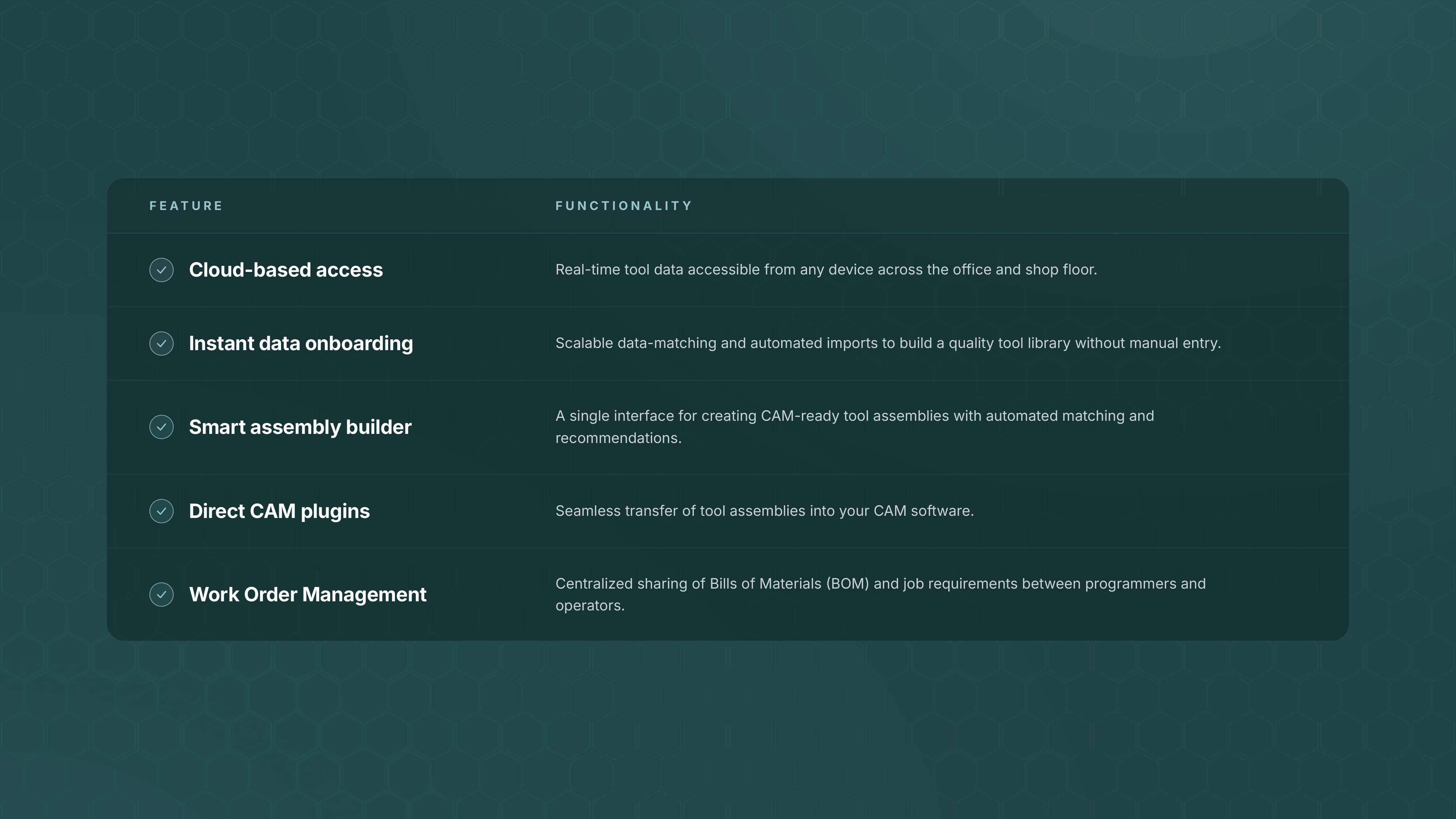
At the end of the day, a tool management system is only as good as its adoption rate on the floor. Beyond technical features, make sure the platform is intuitive enough to be used without extensive training and backed by a support team that understands the urgency of a machine shop.
How to transition to digital tool management (without the downtime)
The biggest myth about going digital is that you have to shut down production to count every nut and bolt. In reality, the best implementations happen in the background while the chips are flying.
- Start with your Top 20: Identify the 20% of tools that handle 80% of your work and get those into the system first. This gives you immediate ROI on your most frequent jobs without the overwhelm.
- Clean as you go: Instead of a shop-wide audit, make it a rule that when a tool assembly comes back to storage, it gets logged into the software. Within a month, your most active inventory is digitized.
- Pick your internal champions: Don't force the whole shop to learn on day one. Pick one programmer and one operator to run a pilot. Once they see how much time it saves them, the buy-in from the rest of the team will happen naturally.
By the time you’ve finished your first few digital work orders, you’ll realize that the mountain of data was really just a series of small steps.
The path forward
Few things drain a shop’s potential as much as the time spent managing information instead of making parts. The realization that data should work for the shop, not the other way around, has already redefined how the most successful businesses operate, and modern manufacturing is no exception.
Ultimately, a modernized, lean shop is less about the software you use and more about having the clarity to focus on growth rather than just keeping up with the day-to-day.