



Excel is often the first place manufacturers turn to for managing tool data. It’s familiar, flexible, and easy to adapt to whatever system a team already has in place.
And for a while, it can work perfectly well.
The challenges start when the spreadsheet becomes a system of its own with multiple versions, manual updates, duplicate entries, and more people relying on the same data across programming, setup, and production.
At that point, the question is no longer whether Excel can manage tool data, but whether it can still do it efficiently.
So, when does a spreadsheet stop being enough, and what actually changes when you move to dedicated tool management software?
Why Excel works for tool management
There’s a reason so many teams start with Excel. Most people know how to use it, and a spreadsheet can be set up quickly around the way a team already works.
For a relatively simple tooling environment, that flexibility can be a real advantage. You can create your own structure, add the fields that matter to your shop, and easily make changes without having to configure a new system.
It’s perfectly adequate when only a small number of people manage the data, the tool library is relatively stable, and there’s little need to share information across different systems.
So, tool management with Excel isn’t inherently a bad approach, but once the amount of data, number of users, or complexity of the workflow starts to grow, you may run into some challenges.
Excel vs tool management software
At a basic level, Excel organizes tooling information in a flexible spreadsheet structure, while dedicated tool management software stores and manages tooling data as structured records in a centralized system.
Let’s look at how Excel and dedicated tool management software compare across the areas that matter most when managing tooling data.
| Excel | Tool management software | |
|---|---|---|
| Setup | Quick to start with little or no onboarding | Requires initial setup and onboarding |
| Flexibility | Highly customizable to individual workflows | More structured around tooling workflows |
| Initial cost | No cost if Excel is already licensed | Requires a software license or subscription |
| Data maintenance | Relies on manual updates and ongoing upkeep | Data is maintained centrally and updated once |
| Multi-user access | Possible, but depends on clear file ownership and processes | Built for shared access across teams |
| Version control | Limited to file-level version history or manually saved copies | Users work from the same live database, reducing duplicate versions |
| CAM integration | No native connection to CAM systems; tool data must usually be transferred manually | Can connect directly to supported CAM systems and share tool data between systems |
| Assembly management | Documented and maintained manually | Created, stored, and reused within the system |
| Scalability | More users and data usually mean more manual maintenance | Designed to manage larger tool libraries, more users, and more complex workflows |
Excel may still be a good fit if:
- One or two people manage the tool data
- The tool library changes infrequently
- Most information is kept in one place
- The spreadsheet is easy to maintain
- There’s little need to connect tool data with other systems
The key question to ask yourself here is: does Excel make the process easier, or has maintaining it become part of the problem?
5 signs you’ve outgrown Excel for tool management
Excel becomes less practical when keeping the system accurate starts taking more effort than using the information itself. Here are five signs you may be reaching that point.
1. You’re spending too much time maintaining the spreadsheet
Adding new tools, updating dimensions, correcting naming inconsistencies, and keeping records current starts to become a job in itself.
2. The same tool data exists in multiple places
Say a cutting tool, holder, or tool assembly needs updating.
In an Excel-based workflow, that change may need to be updated in the spreadsheet, the CAM library, setup documentation, and any other files where the same tooling information is stored. Every duplicate creates another place that needs to be updated. If one of those places is missed, different teams can end up working with different information.
With dedicated tool management software, you maintain that tooling data in one central place and make the updated information available across the systems and workflows that use it.
3. People aren’t always sure which information is current
Once multiple versions of a file exist, it becomes harder to know which one is the source of truth, so your team spends even more time checking which information is most current and accurate.
4. Your system depends on one or two people
If only the person who built the spreadsheet understands the naming conventions, formulas, or structure behind it, the system becomes difficult to scale and maintain.
5. Growth creates more admin work than it should
Adding more tools, users, machines, or jobs shouldn’t require rebuilding the way information is managed. If every increase in complexity creates more manual work, the spreadsheet may no longer be the simplest option.
What to consider before switching to dedicated tool management software
Moving away from spreadsheets doesn’t automatically make tool management easier. The software still needs to fit the way your team works, and switching systems comes with its own setup and onboarding effort.
When comparing tool management software, start with the data and workflows you already have rather than the length of the feature list.
If years of tooling information are stored in spreadsheets, find out how that data can be imported and how much manual cleanup will be required. Access to existing manufacturer data can also reduce the amount of information that needs to be entered from scratch.
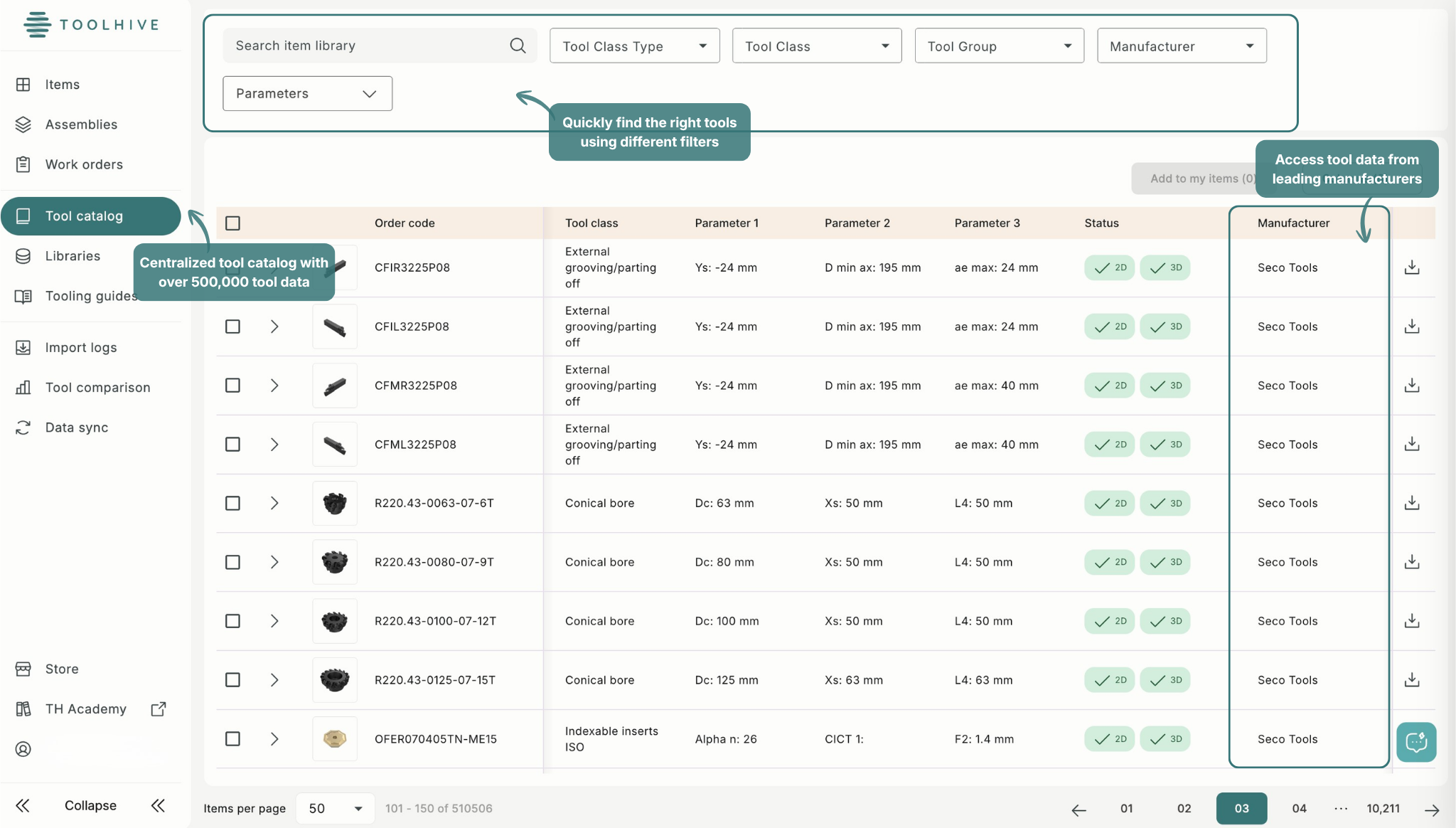
Compatibility matters too. If tool data needs to move between your management system and CAM software, check which integrations are supported and what information can actually be exchanged.
You’ll also want to consider who needs access, how the system handles permissions and updates, and how easy it will be for the people using it every day to adopt.
Finally, compare the cost of the software with the cost of your current process. That includes the subscription price, but also the time spent maintaining spreadsheets, entering the same data in multiple places, fixing inconsistencies, and searching for information.
So, is it time to move beyond Excel?
If your tooling setup is relatively simple, the data is easy to maintain, and the people who need it can access reliable information without much extra work, Excel may still be all you need.
However, it may be time to consider dedicated tool management software if:
- Multiple people rely on the same tool data
- Tool information is duplicated across Excel, CAM, and other files
- Your team regularly checks which version is current
- New tools require repeated manual data entry
- Maintaining the system is creating more work as the operation grows
Just because dedicated tool management software exists doesn’t always mean it’s the right choice for you. The goal is to use a system that matches the complexity of your workflow and makes reliable tool data easier to maintain and use.
If that sounds like where your team is today, Toolhive can give you one place to manage tooling data, build and reuse assemblies, and connect tool information with supported CAM systems.
Try Toolhive free for 90 days and see what managing tool data beyond spreadsheets looks like.