


Every machine shop knows downtime costs money. Fewer know how much, or where the real cost actually accumulates.
Most estimates start and end with the machine's hourly rate multiplied by the hours it sat idle. It's a good starting point, but for CNC operations it captures only a fraction of the true cost. The larger and less visible expense begins after the machine is repaired, in the work required to bring it back to producing accurate, sellable parts.
This article breaks down the full cost of CNC machine downtime, including the hidden technical and operational costs that rarely make it into a spreadsheet, how those costs shift depending on the size and type of shop, and the practical steps that reduce them.
How most shops calculate downtime cost
The conventional formula for calculating machine downtime relies on a standard baseline:
Downtime Cost = Unplanned Idle Hours x (Shop Hourly Machine Rate + Direct Labor Rate)
If a 5-axis vertical machining center with a $120/h shop rate sits dead for 3 hours, the baseline calculation reports a loss of $360 in machine time plus operator overhead.
As a quick rule of thumb for estimating direct capacity loss, this formula works. However, it operates on an assumption that the moment the alarm is cleared and the green light turns on, production returns to 100% efficiency. The standard formula treats a CNC machine like an electric light switch – instant on, instant off. It ignores the physics of precision metal cutting and the operational friction required to resume a cycle safely.
To understand why traditional cost models fail, you have to look at what happens outside the machine's internal timer:
- Lost Opportunity Margin: The traditional model covers baseline machine overhead, not the actual gross margin of the high-value parts that should have been cut.
- OEE Degradation: It ignores performance drops (like running reduced override feeds) and quality hits (scrap from thermal shifts).
- Schedule Cascades: It overlooks how a 3-hour bottleneck starves downstream deburring, inspection, and assembly cells.
The nature of this financial impact scales with your shop floor. For an owner-operator running one or two machines, a 2-hour stoppage causes total labor stagnation, halting all billing while the owner troubleshoots. In a high-mix job shop, that same 2-hour delay cascades through the schedule, pushing back secondary turning, inspection, and delivery dates. In large production environments, idle spindles starve automated cell lines, triggering heavy late-delivery penalties. Regardless of scale, standard downtime formulas undercount the total damage. So, while the formula isn't wrong, it is incomplete.
The hidden cost of restarting a CNC machine
When a CNC spindle stops unexpectedly mid-program, a cascade of secondary costs begins to accumulate. This technical and operational recovery period is what truly drives up the cost of an outage.
Thermal drift and spindle re-warming
Resuming a tight-tolerance cut on a cold machine will scrap parts, because the spindle, ballscrews, and castings contract as they cool and shift the tool path. On parts holding tolerances of ±0.0005" (±0.012 mm), that thermal movement is more than enough to scrap a part. Re-running warm-up macros to get the machine back to equilibrium takes time, but skipping it risks expensive scrap.
Lost work offsets and zeroing
After a hard stop, you often can't just press resume, because the control may have lost or nudged your work offsets during the crash. An emergency stop or hard power drop often clears volatile memory or displaces the axis drives slightly. Before resuming a cut, the operator must re-verify or re-touch-off work coordinate systems (G54-G59). Re-probing part features in a semi-machined state takes significantly longer than zeroing a clean block of raw stock.
In-process scrap and dwell damage
A tool that stops mid-cut in stainless, Inconel, or titanium usually means a ruined part, for two reasons:
- Dwell gouging: The cutter leaves a mark or gouge on the surface finish, often ruining a part that already has hours of machining value embedded in it.
- Work hardening: The material at the point of tool contact hardens under the heat and pressure of the sudden stop. When the cut resumes, the tool hits a localized hard spot, dramatically increasing the risk of premature tool breakage.
The setup & tool verification bottleneck
The longest delay in a restart is usually tool verification, not the repair itself. When a stoppage breaks a tool, corrupts an offset table, or forces a job changeover, the machine remains idle while the operator verifies the setup:
- Where is the replacement assembly?
- Is this end mill set to the exact stickout length specified in the CAM file?
- Are these speeds and feeds correct for the current material batch?
When tool data is managed on paper setup sheets or scattered across individual controllers, operators spend 20 to 30 minutes double-checking physical tools against digital specs before they feel safe pressing Cycle Start.
How to calculate the real cost of CNC machine downtime
Siemens' True Cost of Downtime report found that the average time to get production running again after a stoppage has climbed from 49 minutes five years ago to 81 minutes today. Machines fail less often now, but each event takes longer to recover from, partly because of the skills and knowledge that walk out the door when experienced people leave.
That recovery tail is exactly what the raw idle formula misses. To account for it without building a full financial model every time, a realistic rule of thumb is about 1.8 times the raw idle cost.
True Downtime Cost = Raw Idle Cost x 1.8
Where Raw Idle Cost = Unplanned Idle Hours x (Shop Machine Rate + Labor Rate)
If a mill ($100/hr burdened rate) is stopped for 2 hours, the raw idle cost on paper is $200. Applying the 1.8 multiplier yields a true cost of $360. That extra $160 breaks down into three concrete operational buckets:
- Setup & Tool Friction (+0.3x): The 20–30 minutes spent locating replacement tooling, verifying offset numbers, or re-probing work zero on a semi-machined part.
- Thermal & Ramp-Up Losses (+0.3x): The non-productive time spent running spindle warm-up macros to recover thermal stability, plus running initial passes at reduced feed overrides (50%-70%) to avoid crashes.
- Quality & Re-Qualification (+0.2x): The cost of scrap material caused by the sudden stop, plus mandatory CMM or manual first-article re-inspection before returning to full cycle speed.
Reducing machine downtime after a stoppage
Eliminating mechanical breakdowns entirely is impossible. However, you can dramatically shorten the recovery time after a machine stops by removing operational friction on the shop floor.
1. Automate Work Offset Backups
Require operators to run a simple macro at the start of each setup that logs active G54–G59 work offsets and tool offset tables to an external drive or network directory. If a control crash wipes memory during an emergency stop, restoring offsets takes seconds rather than requiring a complete re-setup with an edge finder.
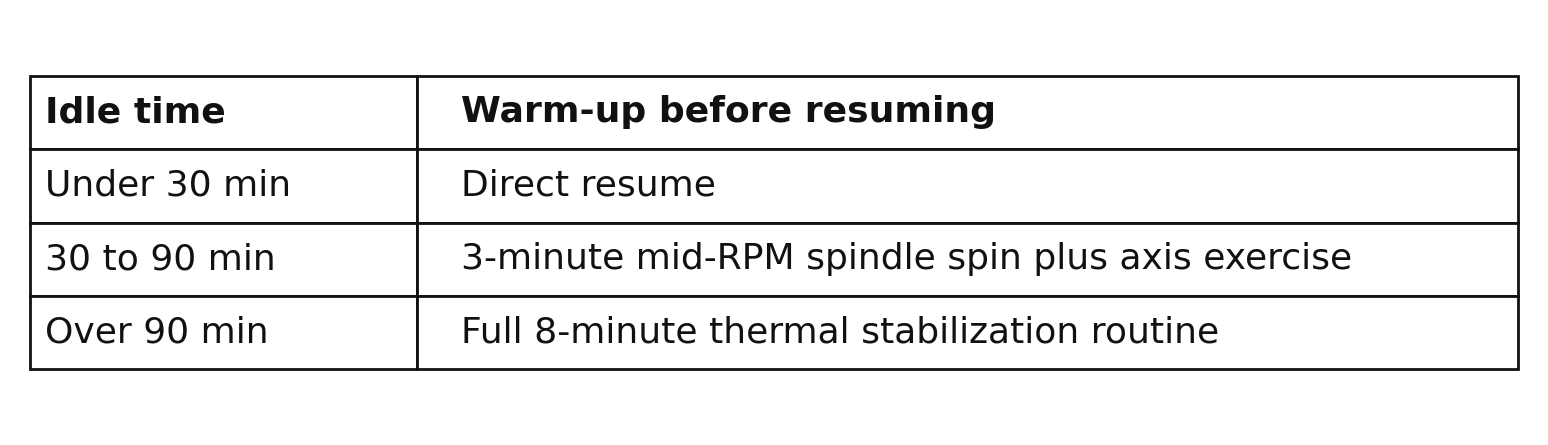
2. Implement Standardized Restart Warm-Up Routines
Instead of guessing whether a spindle is warm enough to hold tolerance, create 5-minute automated warm-up macros scaled to the duration of the stoppage:
3. Log WIP at the Point of Interruption
Train machinists never to clear a halted program off the control screen immediately after an alarm. Recording the exact N-code line number, current tool number, and Z-depth on a physical tag attached to the fixture ensures the next shift or setup tech knows precisely where to safely perform a mid-program block restart.
4. Maintain a Single Source of Truth for Tooling Data
Uncertainty during tool replacement is one of the largest contributors to extended downtime. When an operator has to replace a damaged tool mid-job, they shouldn't have to wander through the tool crib or manually re-verify parameters on a sheet of paper.
Using a CAM-connected tool management system like Toolhive bridges the gap between programming and the shop floor. Operators get instant access to verified 3D tool assemblies, correct offset parameters, and real-time inventory locations. When tool replacement data is clear and accessible, setup errors disappear, and the machine returns to working state significantly faster.
Looking ahead
While you can’t always predict when a coolant pump will fail or a spindle bearing will seize, you have total control over what happens next. When an alarm clears, is your team delayed by the fix itself, or by the scavenger hunt for tools, specs, and offsets required to safely press Cycle Start again?
Only one of those friction points is inevitable.